
For accountants and tax preparers

Your landlord clients, organized
before they reach you.

Rental Bill Tracker is a simple Windows app for small landlords. Your clients file each bill and receipt as it arrives. At tax time they hand you one Excel workbook — expenses paid in the year, totaled by property under the Schedule E lines — and a ZIP of every document behind the numbers.

One page, written for landlords, with room for your name · Nothing for you to install or log into

What you get in April

One ordinary .xlsx workbook. Open it in Excel and work from it the way you already do — no portal, no account, nothing to connect.

With it, a ZIP of every paid bill and receipt for the year, in folders by owner, property and category, with the workbook inside.

  • Summary — expenses paid in the year by owner and property, one column per category, each labeled with its Schedule E line, and a Schedule E total for each property
  • Expenses — every paid item: date paid, owner, property, unit, vendor, category, Schedule E line, amount, how it was paid, bill date, notes and the document’s file name
  • Unpaid bills — listed on their own, never counted in a total
  • Tenant charge-backs — amounts passed on to tenants, like a share of the water bill, and whether they came in
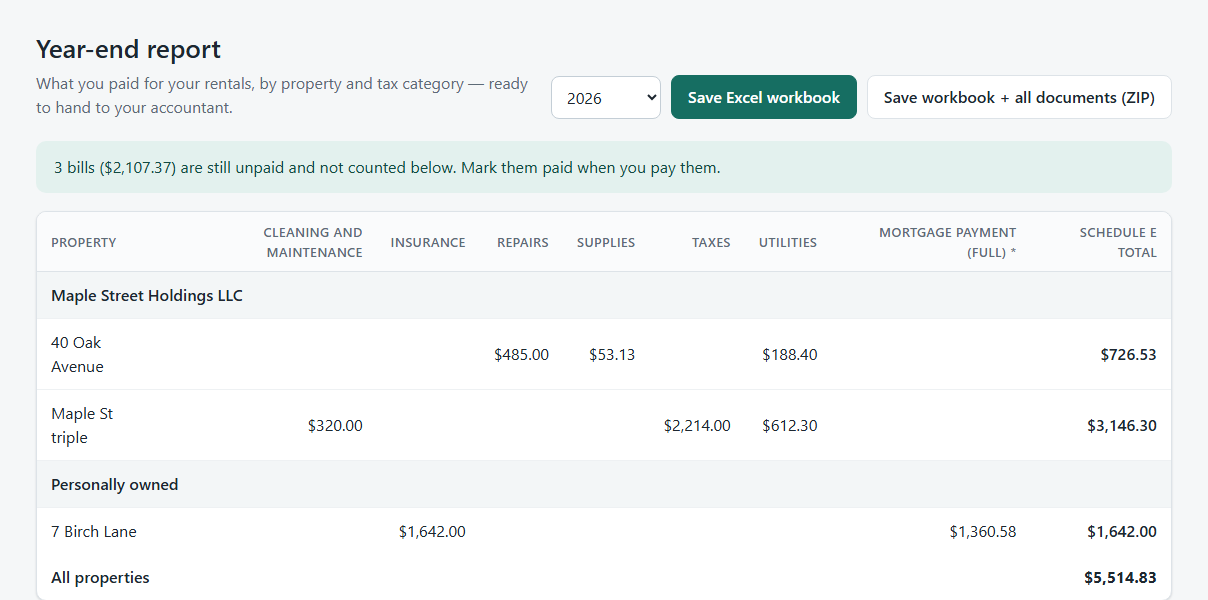
The year-end report: expenses by property under Schedule E categories, grouped by LLC, with buttons to save an Excel workbook or a ZIP of all documents.

Kept the way you’d want it

Cash basis

Each expense counts in the year it was paid. A bill that’s still unpaid sits on its own sheet, out of every total.

Mortgage payments kept out

A full mortgage payment goes in its own column, outside the Schedule E total, so principal isn’t counted as an expense by mistake.

Improvements kept out

A new roof or furnace goes in its own column, outside the total, for you to treat as a capital improvement.

Grouped by owner

Properties are grouped by LLC, with personally owned ones apart. Costs that belong to an LLC but no single building get their own row for you to allocate.

A document for every line

Each row on the Expenses sheet names its file, and the file is in the ZIP, under that owner, property and category.

Your client’s data, on their computer

The app has no online account and uploads nothing. You get the files when your client sends them — the way you get the shoebox today.

What it doesn’t do

So nothing in April is a surprise.

Passing it on to a client

For the client who shows up every year with a bag of receipts.

1

Give them the handout

One page, written for landlords, with a line for your name. Print it, or attach it to your tax organizer email.

2

They try it free

30 days, every feature, no card and no sign-up. Then $89 once per computer until January 31, 2027 ($129 after) — no subscription.

3

You get the workbook

At year-end they save the workbook and the ZIP and send them to you, however you already take files.

Questions from an accountant? Write to me.

Rental Bill Tracker was built by Khac Thai, a Massachusetts landlord with his own pile of bills. If the workbook isn’t laid out the way you’d want to receive it, I’d like to hear that — it’s early, and accountants’ answers shape what comes next.